You're Not Buying Software.
You're Buying Implementation.
Every SAM deployment includes guided setup wizards and professional Click IT support — in-person, phone, or remote. You're never left alone to figure it out. That's what makes this work.
The Hospital EMR Lesson
"A major hospital system built their own electronic medical records system. World-class facility. Best developers money can buy. They still switched to Epic."
Why? Epic had deployed to thousands of hospitals and solved every edge case. But more importantly: Epic consultants implement it with you.
You don't buy Epic and figure it out yourself. You buy Epic implementation — the software plus the expertise to make it work in your environment.
That's the SAM model. You're not buying software to configure. You're buying a deployment with Click IT standing behind every integration — backed by 13+ years of IT service delivery and 6 patents.
How a SAM Deployment Works
From first call to fully operational — here's what the process looks like:
Discovery Call (15 minutes)
We learn your tools, your team size, and your workflows. We confirm SAM is a fit — and if it's not, we'll tell you honestly.
Hardware Ships Pre-Configured
Your Mac Mini arrives with SAM installed, your integrations pre-loaded, and your industry skills ready. Plug it in and power it on.
Guided Setup Wizards
SAM walks you through each integration step by step — email, calendar, CRM, financials. Each wizard is designed so you can complete it with zero technical knowledge.
Click IT On the Call
A Click IT technician is on the phone, on screen share, or in your office during setup. When something fails — admin consent errors, token issues, permissions — we already know the fix.
Verification & Training
We verify every integration is working. Then we train you — 3 to 5 hours over 3 days. How to give SAM tasks. How to review SAM's work. How to adjust settings.
Ongoing Monitoring & Support
SAM includes remote monitoring. When integrations start failing or tokens expire, Click IT is alerted automatically — and often fixes the issue before you notice.
Three Ways We Support Your Deployment
In-Person Setup
Available through our franchise network. A Click IT partner comes to your office and walks your team through every integration step by step. Face to face.
Phone + Screen Share
We schedule a live call, share screens, and guide you through each wizard in real-time. You see it. We verify it. It works before we hang up.
Remote Management
Every SAM includes remote monitoring and management. When something breaks, Click IT logs in and fixes it — often before you even notice something went wrong.
This is the difference. Other AI tools give you documentation and wish you luck. SAM gives you professional implementation support — the same model that made Epic the dominant EMR platform in healthcare.
Example: Microsoft 365 Integration Wizard
Every SAM integration follows this pattern: a guided wizard that walks you through setup, with Click IT available to troubleshoot at every step. Here's what the Microsoft 365 wizard looks like:
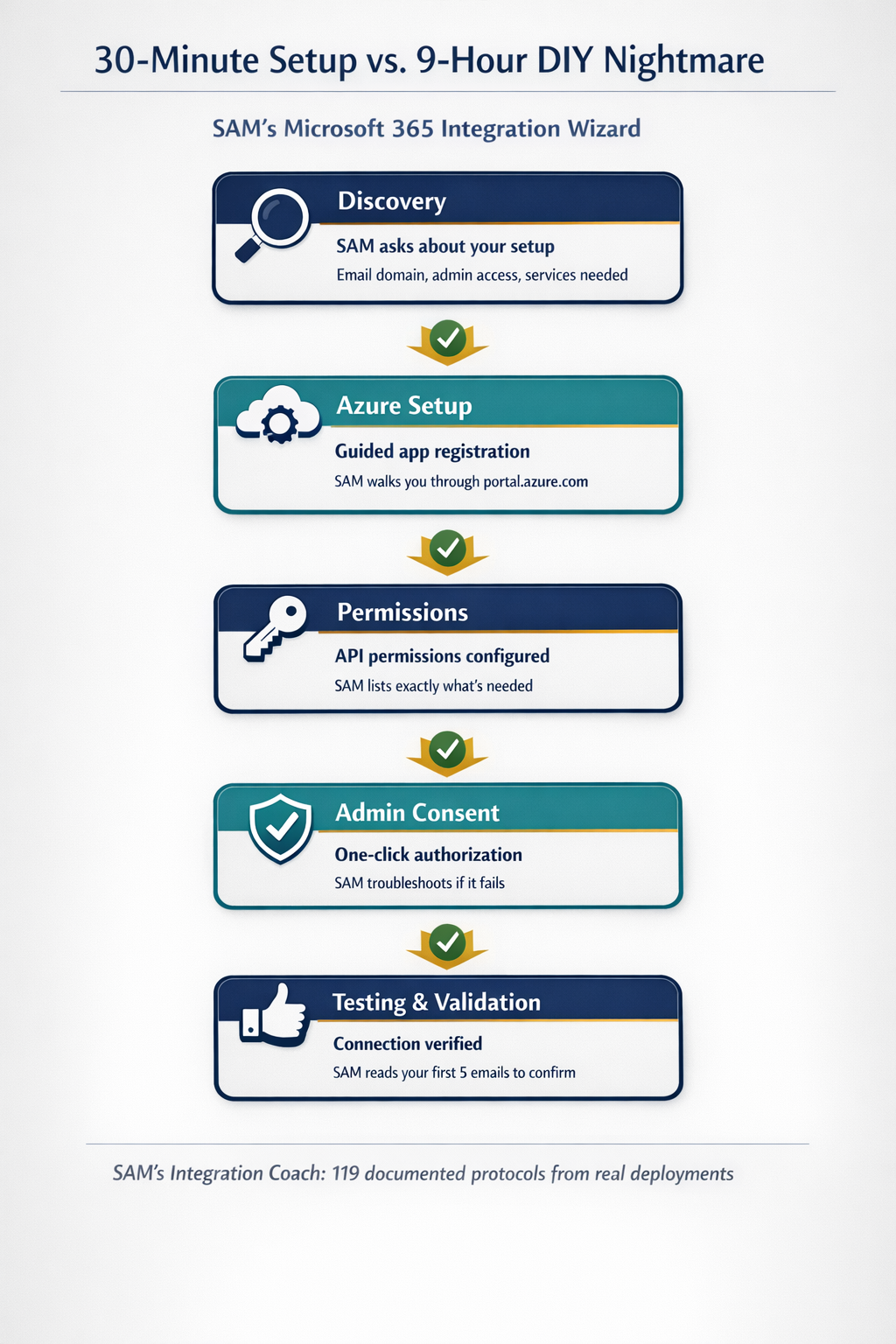
What happens during setup: SAM asks you questions. Click IT is on the call with you (or in your office). When something fails — admin consent errors, token refresh issues, tenant configuration problems — Click IT already knows the fix because we've solved it across dozens of deployments.
Why SAM Deployments Succeed
- Battle-tested protocols from real deployments across multiple industries — edge cases are already solved before you encounter them
- Click IT is accountable for getting it working — not just documentation, but actual hands-on support from people who've done this before
- Remote monitoring included with every deployment — when integrations start failing, we're alerted automatically
- Real-time troubleshooting — we don't tell you to "check the docs"; we see your screen and solve the problem with you
- Multi-tenant experience — if you manage multiple locations or entities, we've done it before (and know exactly where it breaks)
- Post-deployment monitoring — we often fix issues before you notice them, because our monitoring catches failures as they happen
- FaaST platform integration — our proprietary support automation tools give franchise partners faster resolution times and consistent service quality
You're not buying software and figuring it out. You're buying software + implementation expertise + ongoing support. That's how enterprises succeed with SAM where DIY projects fail.
Delivered by Our Nationwide Franchise Network
SAM deployments are supported by professional MSPs through the Click IT franchise network. Our franchise partners combine SAM technology with FaaST (our proprietary support automation platform) to deliver enterprise-grade implementation and ongoing management — locally, in your community.
For MSPs and IT professionals: The Click IT franchise includes SAM + FaaST + proven business systems. You get the technology, the training, and the support infrastructure to deploy SAM for your customers — backed by 30+ years of systems building experience.
Learn About Franchise Opportunities →Every Integration Gets the Same Treatment
Microsoft 365 is just one example. Every integration SAM supports follows the same pattern: guided wizard + professional Click IT support.
- QuickBooks Online: Multi-entity setup, AR/AP configuration, financial reporting
- CRM Systems: Contact sync, email templates, pipeline automation (Salesforce, HubSpot, and others)
- Slack / Teams: Channel configuration, notification rules, bot permissions
- Calendar & Email: Microsoft 365, Google Workspace, scheduling automation
- Industry Tools: MLS for real estate, practice management for legal/medical, ticketing for MSPs
- Custom Integrations: Supported APIs can be evaluated, implemented, and maintained as reviewed deployment-specific skills
Each one gets a wizard. Each one gets professional support. That's the standard.
See the Implementation Process in Action
Schedule a discovery call and we'll walk you through the setup process for your specific tools. See how Click IT handles the complexity that would otherwise take your IT team months to figure out.
Schedule a Discovery Call Franchise OpportunitiesSee the Enterprise Architecture →